
Inventory management software for warehouses and branches in Saudi Arabia
Stock for every item by warehouse and locator, at FIFO or average cost, with batches and expiry dates, serial numbers, stock counts and transfers between warehouses.
- In the Saudi market since 2014
- 1,000+ customers
- Support in Arabic and English
- Ready for ZATCA e-invoicing Phase 2 and listed in ZATCA's solution providers directory
What the Inventory module covers
Inventory works on the same documents as sales and purchasing: a goods receipt adds stock, a delivery note takes it out, and each movement posts its value to the item's accounts.
Document cycle
- Goods receipt note
- Storage in a locator
- Reservation for a sales order
- Transfer
- Delivery note
- Stock count
Multiple units of measure
Buy by the carton and sell by the piece, with a price and a minimum selling price for each unit.
Bundles
A set of items is sold as one line, and each component is taken out of stock on delivery.
Barcodes and labels
Two barcode fields on each item, scanned when selling, and barcode labels printed from the system.
Item accounts
Each item has its own inventory, income and cost accounts, and stock value and cost of goods sold post with every receipt, delivery and adjustment.
Materials for projects and production
Materials go to project jobs and production orders, and come back, through material requests, issues and returns.
Inventory reports
Twenty-one reports, including stock valuation, inventory aging, maintain level, batches, stock movement and stock by warehouse.
Warehouses and the locators inside them
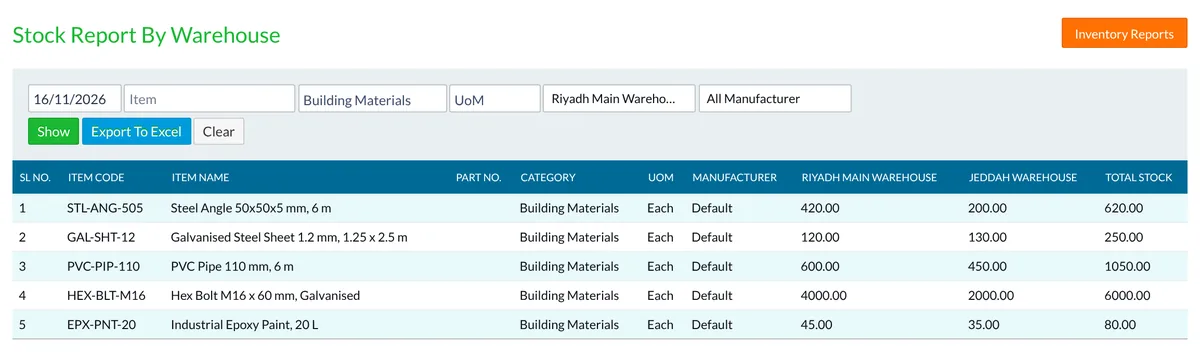
Set up as many warehouses as you need, per branch, project site or plant, each with its own locators: bins, racks or zones. The Stock Report By Warehouse lists items store by store.
- WarehousesPer branch, site or plant.
- LocatorsBins, racks or zones inside a store.
- ReportStock Report By Warehouse, one column per store.
Stock transfers between warehouses
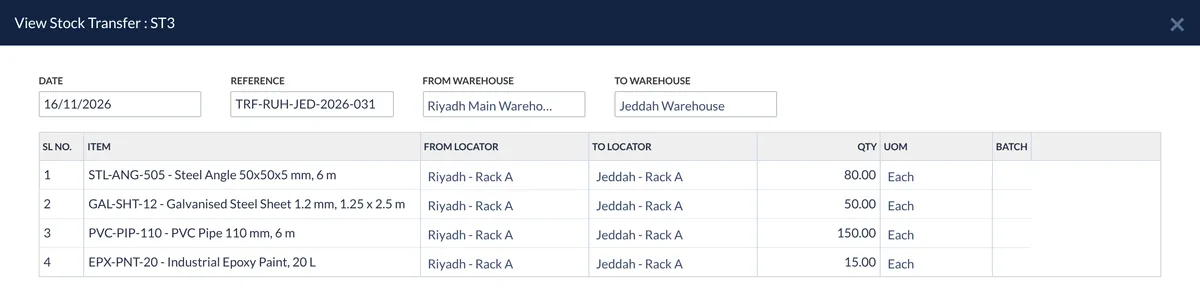
A transfer uses three documents that follow your approval levels: a stock transfer request from the store that needs the goods, a stock transfer from the store that sends them, and Stock Transfer Receive at the receiving store.
- Transfer requestRaised by the store that needs the goods.
- Stock transferIssued by the store that sends them, with the source and destination locator on each line.
- Transfer receiveRecorded at the receiving store on arrival.
Costing, batches and serial numbers
Each item has its own costing method: first in, first out (FIFO) or average. Batch-tracked items carry the batch number, manufacturing date and expiry date from the goods receipt, and the expiry date is checked on every movement, so an expired batch is not issued. Equipment and parts that need warranty follow-up get one serial number per unit.
- Costing methodFIFO or average, per item.
- Expiry checkOn every movement of a batch.
- Serial numbersOne number per unit, recorded at receipt.
Stock counts, adjustments and reorder
The count sheet for a warehouse is uploaded into Stock Taking Management, and Tranquil shows the differences against the recorded stock for adjustment. A Stock Adjustment records damage, shortage or a count difference with its reason, and posts it at the item's cost to the inventory adjustment account. Each item has a minimum and a reorder quantity, and Auto Purchase Order gathers what falls below them.
- Stock takingA count sheet uploaded per warehouse, differences adjusted.
- AdjustmentWith its reason, to the inventory adjustment account.
- ReorderMinimum and reorder quantities, with Auto Purchase Order.
Saudi requirements
- ZATCA e-invoicingSales invoices come from the same system that holds the stock, issued under Phase 2.
- VATA VAT code on every sales and purchase line, with exempt and zero-rated items.
- VAT-inclusive pricesPrice lists can carry prices that include VAT.
Who it is for
Trading companies
Many items, units and price lists, with buying and selling in one flow.
General trading pageDistribution
Several warehouses across branches, stock transfers between warehouses, and stock reserved for approved orders.
Distribution pageManufacturers
Raw materials and finished goods in one item list, with materials issued to production orders.
Manufacturing pageContractors
Site stores next to the main warehouse, with materials issued to project jobs.
MEP contractors pageCommon questions
Questions warehouse and finance teams ask before a demo.
How is a stock count done?
The count sheet for the warehouse is uploaded into Stock Taking Management, Tranquil shows the difference between the counted and recorded quantity, and the differences are adjusted to the inventory adjustment account.
Which costing methods are available?
First in, first out (FIFO) or average, set for each item. The cost follows the item into every delivery, adjustment and report.
Can stock be reserved for customer orders?
Yes. Approving a sales order reserves its quantity, so it is left out of the stock available for sale.
Can a store keeper see only their own warehouse?
Yes. Each user can be limited to their own warehouse, and then sees and moves only the stock they look after.
Can one item sit in several locators?
Yes. Stock is held by warehouse and locator, and the same item can sit on more than one rack inside the same store.
Bring your own items to the demo
Send us a few of your items and warehouses before the session, and we will walk through receipts, transfers, counts and adjustments on them.
Dammam +966 13 848 8080, +966 13 817 7724, Riyadh +966 11 213 1330
[email protected]
Sunday to Thursday, 8 am to 5 pm.
Further reading
- Sales and DistributionReservation on the sales order, issue on delivery.
- ProcurementGoods receipts from purchase orders.
- AccountingInventory and cost accounts.
- StocktakingTypes, steps and tips for an accurate count.
- Inventory turnoverFormula, example and how to improve it.
- Stock adjustmentWhen and how to adjust stock.